This article explains how to link a Vehicle Incident Record (a record within the Vehicle Incident sub-module of the Incident module, used to capture incidents involving one or more vehicles) to a Claims Management Record (a record in the Claims Management sub-module of the Incident module, used to manage insurance claims arising from workplace incidents) in Assure. The link is created from within the Claims Management record and can be applied when creating a new record or editing an existing one. The Claims Management form also supports linking to an Incident Record using the same method.
Cross-module scope: This workflow spans the Claims Management sub-module and the Vehicle Incident sub-module, both within the Incident module in Assure.
Prerequisites
- An active Assure user account with Read and Write permissions for the Claims Management sub-module.
- At least one existing Vehicle Incident Record in the system to link to.
Overview
A Vehicle Incident Record can be linked to a new or existing Claims Management Record. The link is created whilst creating or editing the Claims Management Record.This is done by editing the Claims Management record and selecting the Vehicle Incident reference using the Cog Menu on the relevant linking field.
Steps: Link a Vehicle Incident Record to a Claims Management Record
Step 1: Navigate to Claims Management
In Assure, navigate to Modules > Incident > Claims Management.
Step 2: Open a Record
Click New Record to create a new Claims Management record, or click the Cog Menu on an existing record and select Edit.
Step 3: Locate the Linking Fields
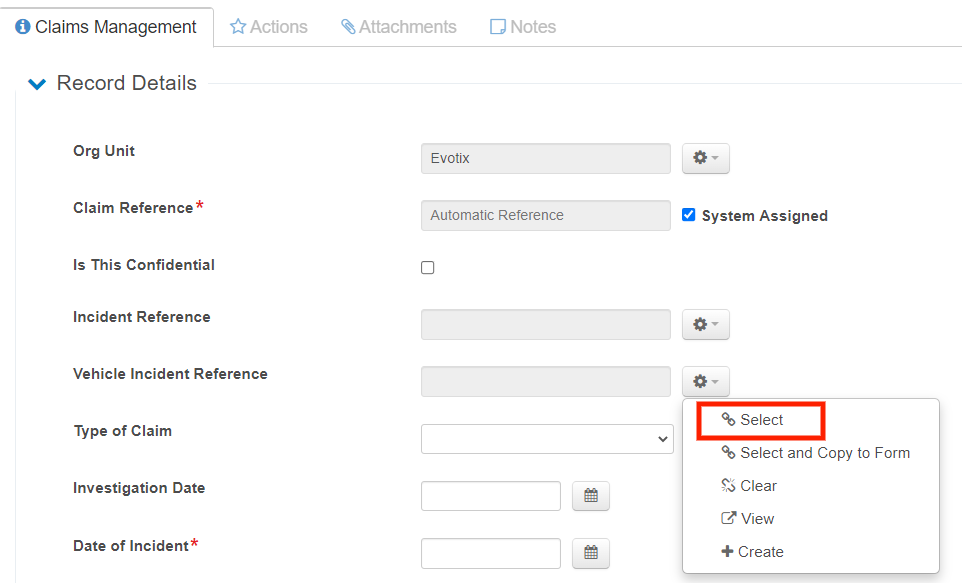
Near the top of the Claims Management form, there are two linking fields:
- Incident Reference -- links the record to an Incident Record
- Vehicle Incident Reference -- links the record to a Vehicle Incident Record
Step 4: Select the Vehicle Incident Record
Click the Cog Menu button next to the Vehicle Incident Reference field. A selector pop-up opens, displaying available Vehicle Incident Records.
Step 5: Select the Required Reference
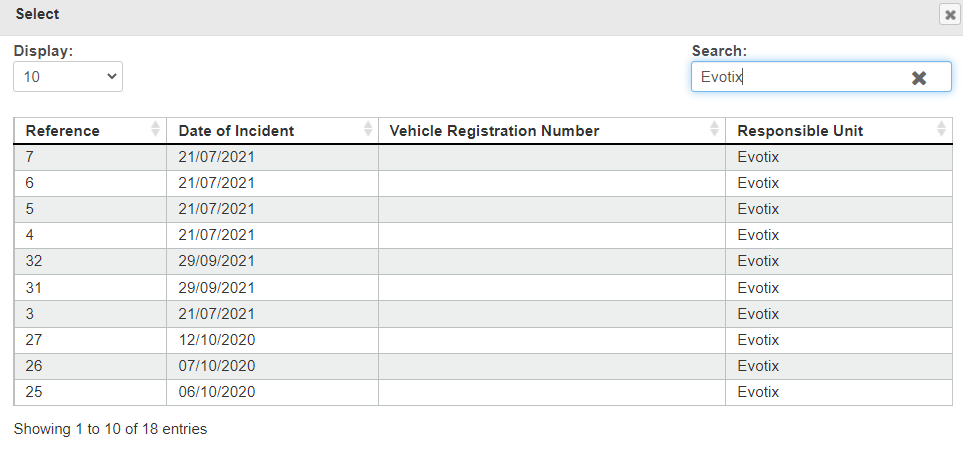
Click the required Vehicle Incident reference from the list. The field on the Claims Management form automatically populates with the selected reference.
Step 6: Complete and Save the Record
Enter all remaining required details for the Claims Management record and click Save and Close at the bottom of the form.
Notes
- The same linking method applies if an Incident Record needs to be linked instead of a Vehicle Incident Record. Use the Incident Reference field and follow the same steps.
- A Claims Management record can be linked to either an Incident Record or a Vehicle Incident Record, or to both simultaneously.
- The link can be applied at any time by editing an existing Claims Management record.
AI Metadata
Product Area: Assure -- Claims Management, Vehicle Incident, Incident module
User Role: Any Assure user with Read and Write permissions for the Claims Management sub-module
Tags: Claims Management, Vehicle Incident, link record, Incident module, Cog Menu, Claims record, Vehicle Incident reference, Incident reference
Version/Region: All Assure versions; all regions
Important synonyms:
- Claims Management = Claims module = Claims record
- Vehicle Incident = Vehicle Incident Record = vehicle accident record
- Cog Menu = Cogwheel Menu = Menu Cog = settings icon
- Incident Reference = Incident link field
- Vehicle Incident Reference = Vehicle Incident link field
Suggested embedding keywords: link claims management vehicle incident Assure, link vehicle incident to claims record, claims management incident reference field, how to link claims management Assure, vehicle incident claims link Assure, create claims management record linked to vehicle incident, Cog Menu claims management form Assure
Relevant modules and cross-module implications: This article spans the Claims Management sub-module and the Vehicle Incident sub-module, both within the Incident module in Assure. The Claims Management form contains two linking fields: one for Incident Records and one for Vehicle Incident Records. Both fields use the same Cog Menu selection method. Linking a Vehicle Incident Record to a Claims Management record creates a relationship between the two records visible within Assure. The Claims Management API also supports providing a Vehicle Incident Reference when creating or updating Claims Management records programmatically, using the Select option only.